Ebay Product Research
This guide walks you through eBay product research from raw data pull to validated listing in about 90 minutes. You'll use Seller Hub's built-in Terapeak tool and ZIK Analytics to identify products with proven demand, healthy margins, and beatable competition.

eBay Product Research: How to Find Winning Products Using Seller Hub and ZIK Analytics
This guide walks you through eBay product research from raw data pull to validated listing in about 90 minutes. You'll use Seller Hub's built-in Terapeak tool and ZIK Analytics to identify products with proven demand, healthy margins, and beatable competition.
Before You Start
You need an active eBay seller account with access to Seller Hub (free for all sellers). Terapeak Product Research lives inside the Seller Hub Research tab and gives you three years of sales data, including sell-through rates, average sold prices, and Best Offer history. According to eBay's Seller Center, "Product Research helps you determine what to sell, when to sell it, and at what price." If you want deeper analytics, create a free trial on ZIK Analytics ($29.99/month after trial), which layers in supplier matching from AliExpress and Amazon.
You'll also need a spreadsheet open. Google Sheets works fine. Track five columns: product name, average sold price, sell-through rate, estimated COGS, and projected margin percentage. If you haven't nailed down how to calculate profit margin, handle that first.
Time required: 60-90 minutes for a full research cycle on one product category.
Step 1: Pull Sold Listings from Seller Hub
EBay's own product research tool inside Seller Hub is where every research session starts. The data covers recent marketplace supply, demand, and pricing across millions of items, filtered by condition, format, and date range. No guesswork, no sampling bias.
Here's the exact sequence:
Log into Seller Hub → click the Research tab
Enter a product keyword or UPC/ISBN
Set the date range to the last 90 days (default is 30, but 90 gives you trend visibility)
Filter by Sold items and Item condition (New, Used, or Refurbished depending on your model)
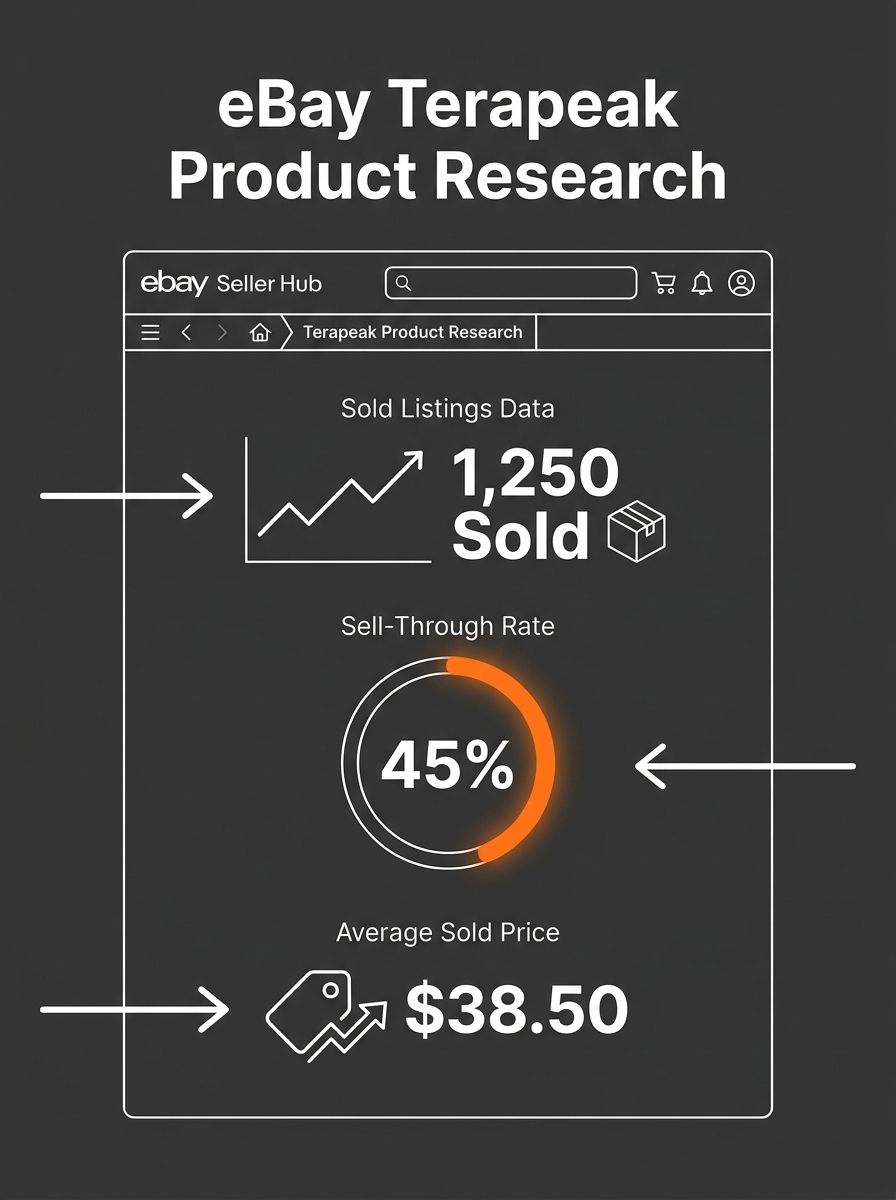
You'll see average sold price, total sold count, and sell-through rate displayed as a percentage. Write these numbers in your spreadsheet for every product you're evaluating.
You'll know it worked when you have a list of 8-12 products with sold-count data from the last 90 days. If Terapeak shows zero sold listings, the demand signal is too weak to pursue.
Step 2: Calculate Sell-Through Rate Against Active Supply
Sell-through rate is the single most important metric in product research eBay surfaces through Terapeak, and most sellers misread it. The number tells you what percentage of available inventory actually sold during your date window. A 60% sell-through rate means 60 out of every 100 listings resulted in a sale.
Here's how to evaluate it:
Above 65%: Strong demand relative to supply. Worth pursuing if margins work.
40-65%: Moderate demand. You'll need competitive pricing or differentiated listings to win.
Below 40%: Oversupplied or declining. Walk away unless you have a cost advantage nobody else has.
Cross-reference the sell-through rate with total listing volume. A 90% sell-through on 12 total listings means the category is too small to build volume. You want categories where sell-through exceeds 50% AND total sold count tops 200 units in 90 days.
ZIK Analytics adds a layer here that Terapeak doesn't: sales velocity tracking over time. According to ZIK Analytics, sellers should look for "the highest sales velocity and a healthy profit margin" to identify winning products. If the velocity trend declines week over week, the window may be closing even if the 90-day aggregate looks solid.
You'll know it worked when you've narrowed your list from 8-12 products down to 4-5 with sell-through rates above 50% and sold volumes above 200 units.
Step 3: Vet Your Supplier Margins
Product demand without margin is a hobby. This step determines whether you can actually profit after eBay fees, shipping, and COGS eat into your sold price.
For each of your remaining 4-5 products, find a supplier on AliExpress, Amazon (for arbitrage), or a domestic wholesaler. ZIK Analytics has a built-in supplier-matching feature that pulls comparable products from AliExpress and Amazon automatically. If you're sourcing from AliExpress, factor in shipping windows that can stretch from 7 to 50 days depending on service tier.
Run the margin math for each product:
Average sold price on eBay (from Step 1)
Subtract eBay fees: 13.25% final value fee for most categories (check your specific category)
Subtract payment processing: ~2.9% + $0.30
Subtract COGS: supplier price including shipping to you
Subtract outbound shipping: cost to ship to buyer (or factor into free-shipping pricing)
Your target: minimum 30% net margin after all fees. Below 25%, one return or pricing mistake wipes your profit. Use the step-by-step margin calculation method if you want the detailed formula.
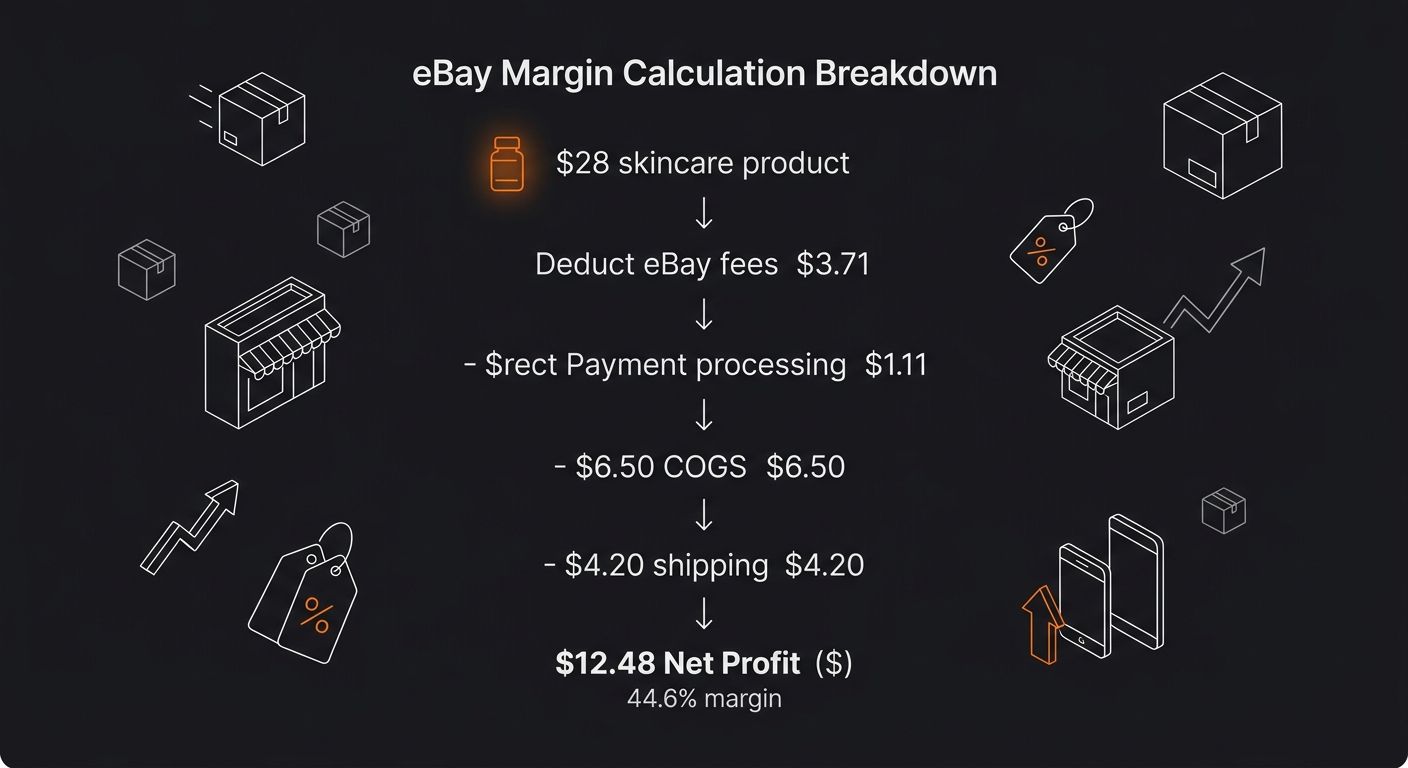
Example: A skincare product sells for $28 average on eBay. eBay fees: $3.71. Payment processing: $1.11. COGS from AliExpress: $6.50. Shipping: $4.20. Net profit: $12.48 per unit, or 44.6% margin. Green light.
Skincare is a strong category right now. According to Vendoo's analysis of best-selling eBay items, facial cleansers, serums, moisturizers, and sunscreens consistently perform well, with CeraVe, La Roche-Posay, and Drunk Elephant among the top brands.
You'll know it worked when you've eliminated any product below 25% net margin and have 2-3 candidates above 30%.
Step 4: Run a Competitive Pricing Scan
You have demand-validated, margin-positive products. Now check whether the competitive landscape actually lets you win visibility inside eBay's Cassini search algorithm.
Go back to Terapeak and pull the top 20 active listings for each remaining product. Record:
Listing format: Auction vs. Buy It Now (BIN dominates most categories now)
Price clustering: Where do the top sellers price? If 15 out of 20 sit at $27.99 and you need $29.99 to maintain margin, you'll struggle for clicks
Listing quality: Photos, title keyword density, item specifics filled out. Poor-quality competition signals that a well-optimized listing can grab share
Seller ratings: Are top sellers 10,000+ feedback powersellers, or smaller accounts? Competing against established Top Rated Plus sellers requires either a price or listing quality edge
For UK sellers, kitchen products like coffee machines, kettles, and food processors are top-performing categories on eBay UK, often with less competition from major retail brands than electronics.
You'll know it worked when you've identified a pricing window where your product sits within the competitive range while keeping your 30%+ margin.
Step 5: Test, Track, and Scale
Don't order 500 units based on research alone. Data tells you what's probable. A test batch tells you what's real. Here's the protocol that's worked across my own launches and the sellers I've consulted for.
Order 10-25 units from your supplier (or list 5-10 if you're doing retail arbitrage)
Create 2-3 listing variations: different title keyword structures, different primary photos, different price points within your margin-safe range
Run for 14 days minimum: Cassini needs time to index and rank new listings. Pulling the plug at day 5 gives you unreliable data
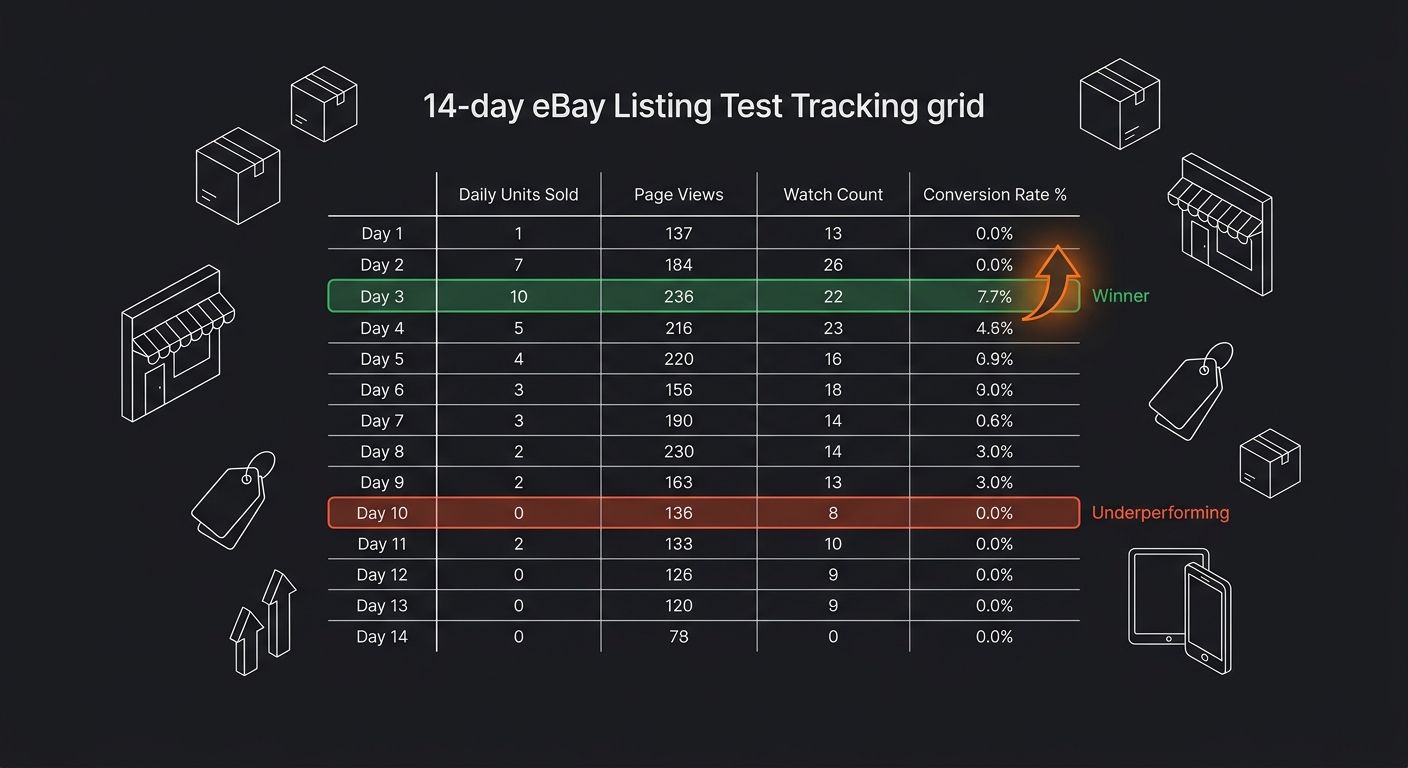
Track daily: units sold, page views, watch count, conversion rate (sold ÷ views)
Your benchmark: minimum 2% conversion rate on Buy It Now listings. Below 1.5%, your listing needs rework. Above 3%, you've found something worth scaling hard.
The winning variant gets the bulk inventory order. As ZIK Analytics recommends, "Double down on this listing format, order bulk inventory from your supplier, and scale up your eBay marketing efforts."
You'll know it worked when you have 14 days of sales data on at least 2 listing variations, with one clear winner showing 2%+ conversion and your target margin confirmed by actual transaction prices.
When the Numbers Don't Add Up
Three problems commonly derail eBay product research. Knowing what breaks saves you from sinking money into dead-end inventory.
High sell-through but tanking average price. You pulled 90-day data and sell-through looks great at 72%. But month over month, the average sold price dropped from $34 to $22. New competitors are undercutting each other and margin is collapsing. Fix: Use Terapeak's date range filter to compare the most recent 30 days against the prior 60. If the price trend drops more than 15%, move on to a different product.
Supplier cost doesn't match your margin math. You found a product at $8 on AliExpress, but when you place the actual order, shipping adds $6 and the total lands at $14. Your margin just dropped from 40% to 18%. Fix: Always get a shipping quote to your specific address before calculating margins. If you're evaluating beauty and cosmetics suppliers from China, landed cost surprises are especially common on heavier or fragile products.
Category restrictions you didn't check. eBay restricts selling in categories like fine art, certain electronics, and some health products. You complete all five steps, source the product, and then your listing gets removed. Fix: Check eBay's Seller Center restricted items list before Step 3. Five minutes of checking saves days of wasted sourcing work.
Where to Go From Here
The product research eBay provides through Terapeak and Seller Hub covers enough ground for most sellers to find profitable niches without paying for third-party tools. ZIK Analytics earns its $29.99/month when you're scaling past 50+ active listings and need automated supplier matching, trend alerts, and cross-platform arbitrage scanning. The full Terapeak feature breakdown covers what each access tier includes and where the free version runs out of depth.
Run this research cycle weekly. Markets shift, competitors enter and exit, and seasonal trends create windows that only appear if you're watching the data consistently. The best eBay sellers I've worked with spend 2-3 hours per week on product research alone, treating it as a direct revenue activity. Across 1.7 billion active listings, the sellers who find high-demand, low-competition pockets first capture margin before the category gets crowded. Everyone else fights over scraps at the bottom of the pricing ladder.

Ryan Torres
Ryan Torres is a former Amazon FBA seller turned dropshipping consultant who has generated over $2.8M in ecommerce revenue across 14 product launches. He specializes in supplier vetting, margin optimization, and scaling DTC operations for sub-$1M brands. Ryan focuses on actionable frameworks that drive measurable results for independent operators.
Frequently Asked Questions
- How do I find winning products to sell on eBay?
- Start by pulling sold-listing data from eBay's Terapeak tool in Seller Hub, then calculate sell-through rates and profit margins. Look for products with sell-through rates above 50%, sold volumes above 200 units in 90 days, and net margins of at least 30% after all fees. Validate your findings with a 14-day test batch of 10-25 units before scaling up.
- What is a good sell-through rate on eBay?
- A sell-through rate above 65% indicates strong demand relative to supply, 40-65% shows moderate demand requiring competitive pricing, and below 40% suggests the category is oversupplied. Ideally, you want a sell-through rate above 50% combined with total sold count exceeding 200 units in a 90-day period.
- How do I calculate profit margin for eBay products?
- Subtract all costs from your average sold price: eBay's 13.25% final value fee, payment processing fees (~2.9% + $0.30), product cost from supplier, and outbound shipping. Your target should be a minimum 30% net margin after all fees to protect against returns or pricing mistakes.
- What tools do I need for eBay product research?
- You need an active eBay seller account with access to Seller Hub's free Terapeak tool, which provides three years of sales data including sell-through rates and average sold prices. For deeper analytics like supplier matching from AliExpress and Amazon, you can use ZIK Analytics ($29.99/month after a free trial). A spreadsheet is also essential to track product data.
- How long should I test a product before ordering in bulk?
- Run a test batch for a minimum of 14 days, ordering 10-25 units to test 2-3 listing variations. Track daily sales, page views, and conversion rates—your benchmark is a minimum 2% conversion rate for Buy It Now listings. Once you have a winning variant, place your bulk inventory order.
- What are common reasons eBay product research fails?
- The most common pitfalls are high sell-through rates paired with declining average prices (indicating price wars), supplier costs that don't match your margin calculations when you get actual shipping quotes, and choosing products in eBay-restricted categories. Check eBay's restricted items list before sourcing and verify landed costs with real shipping quotes to your address.
- How often should I do eBay product research?
- Run the research cycle weekly because markets shift, competitors enter and exit, and seasonal trends create windows that only appear with consistent monitoring. Top eBay sellers spend 2-3 hours per week on product research as a direct revenue activity.
Related Articles

Terapeak Product Research: Complete Guide
EBay absorbed Terapeak into Seller Hub under the label "Product Research," giving every seller with a Seller Hub account access to up to three years of completed transaction data.

Why Your Product Research Is Producing Low-Margin Losers: 6 Validation Mistakes and How to Correct Them
80/20 Sourcing's product selection analysis names tool-dependent research as the top mistake that sinks ecommerce businesses before they ship a first order.

How to Build a Niche Demand Validation Stack Using Google Trends, Reddit, and Amazon BSR Before You Source a Single Product
Novadata's 2026 Amazon BSR guide identifies subcategory rank, not main-category rank, as the actionable metric for niche competitive analysis.
Explore more topics