Printify: Complete App Review & Guide
Printify is a print-on-demand marketplace that routes your orders to a network of over 100 independent print providers who manufacture and ship products under your brand.
Printify: Complete App Review & Guide
Printify is a print-on-demand marketplace that routes your orders to a network of over 100 independent print providers who manufacture and ship products under your brand. Your margin, product quality, and delivery speed hinge on which provider you select from that network, not on the platform itself.
What the Platform Actually Does
Printify is a product design tool, order router, and provider marketplace wrapped into one dashboard. You upload artwork, apply it to blank products from a catalog of over 1,300 items, set your retail price, and publish listings to connected storefronts. When a customer buys, the order routes automatically to whichever print provider you've assigned to that product.
The company earns its cut through a margin on the fulfillment price. The pricing page states there are no platform fees, listing fees, or hidden charges. You pay the base product cost plus shipping when an order comes in, and you keep the spread between that cost and your retail price. On the free plan, a standard unisex t-shirt from a US-based provider runs roughly $9.50–$13.00 depending on the provider and print method. Premium subscribers see those costs drop by up to 20%.
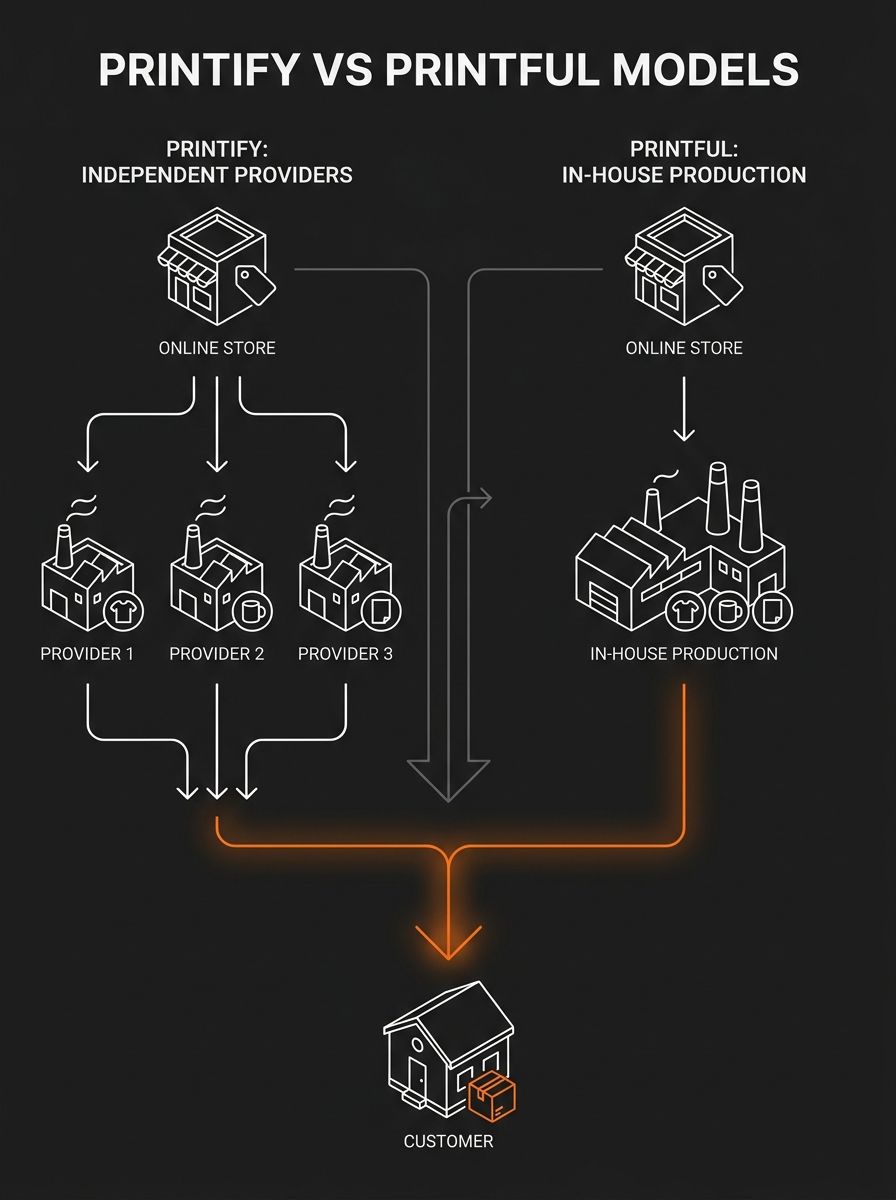
This structure differs from competitors like Printful, which manufactures in-house at its own facilities. A head-to-head comparison on BootstrappingEcommerce concluded that the platform "wins on price, product range and shipping time" while "Printful wins on product quality, integrations and branding customization." That tradeoff defines everything about how you should evaluate the service.
How Multi-Provider Fulfillment Routes Orders
The mechanism that makes this platform distinct from single-source POD services has three layers: product assignment, provider routing, and independent fulfillment.
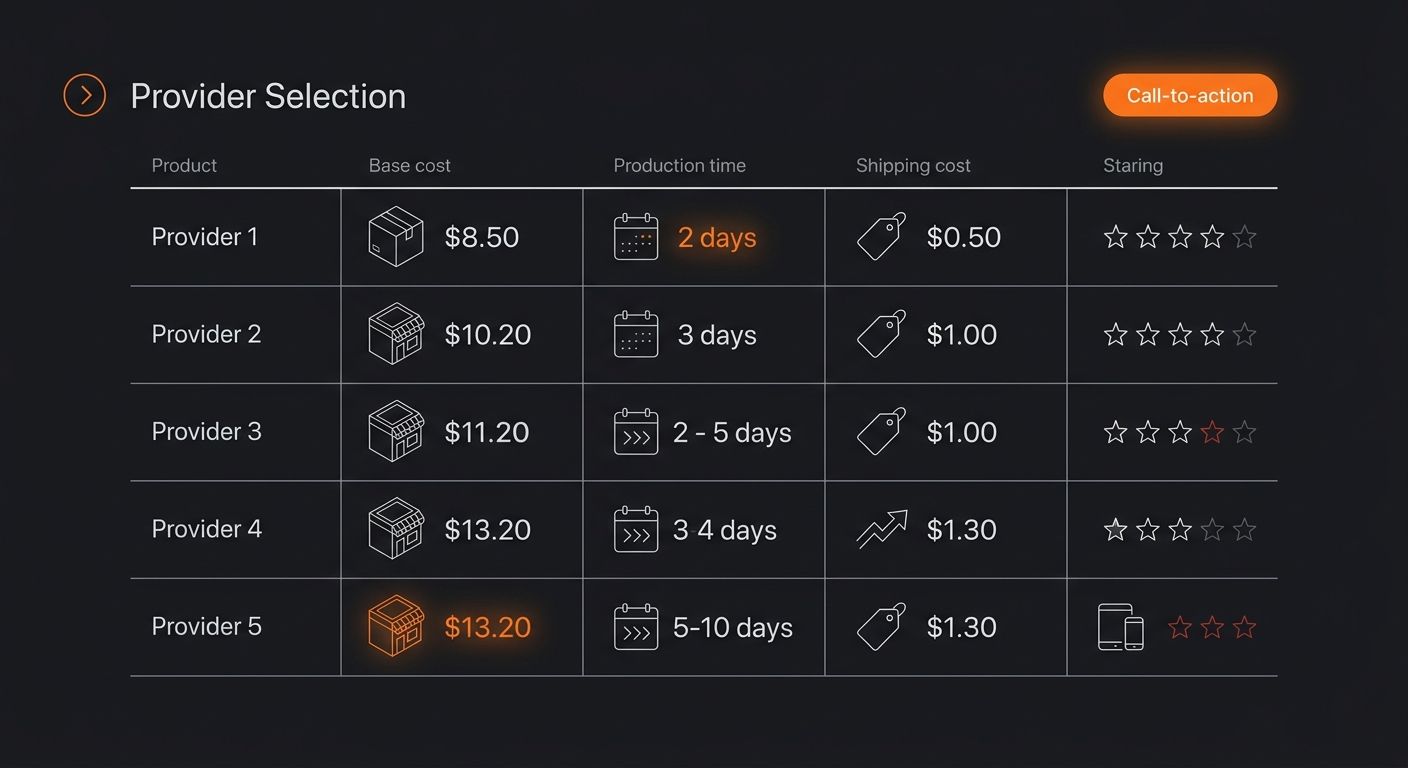
Product assignment happens when you create a listing. For each product, say, a Bella+Canvas 3001 unisex tee, you'll see 8-15 providers offering that same blank. Each one lists its own base cost, production time (typically 2-5 business days), shipping cost, and average review score from other sellers. You pick one. That provider is now locked to that product listing.
Provider routing triggers when a customer places an order. The platform sends the order data (artwork files, size, quantity, shipping address) directly to the assigned provider's production queue. You don't touch fulfillment. You don't pack anything. The provider prints, packs, and ships with a return address you configure.
Independent fulfillment means each provider operates its own facility with its own equipment, inks, and quality standards. A provider in Charlotte, North Carolina runs different DTG printers than a provider in Riga, Latvia. Print consistency, color accuracy, and fabric handling vary accordingly.
This architecture is why I recommend what I call the Three-Sample Test before committing to any provider: order the same design on the same product from three different providers, compare the output side-by-side, and only then assign your listing. The $30-40 you spend on samples saves you from a 1-star review avalanche. For more on how catalog sync and data flow works under the hood in POD setups, we covered the technical side in our piece on print-on-demand integration models.
Pricing Tiers and Real Margin Math
Three plans exist: Free, Premium ($24.99/month), and Enterprise (custom pricing for high-volume sellers).
Feature | Free | Premium ($24.99/mo) | Enterprise |
|---|---|---|---|
Product catalog access | Full (1,300+ items) | Full (1,300+ items) | Full (1,300+ items) |
Product discount | None | Up to 20% | Custom negotiated |
Stores connected | 5 | 10 | Unlimited |
Platform fee per order | $0 | $0 | $0 |
Dedicated account manager | No | No | Yes |
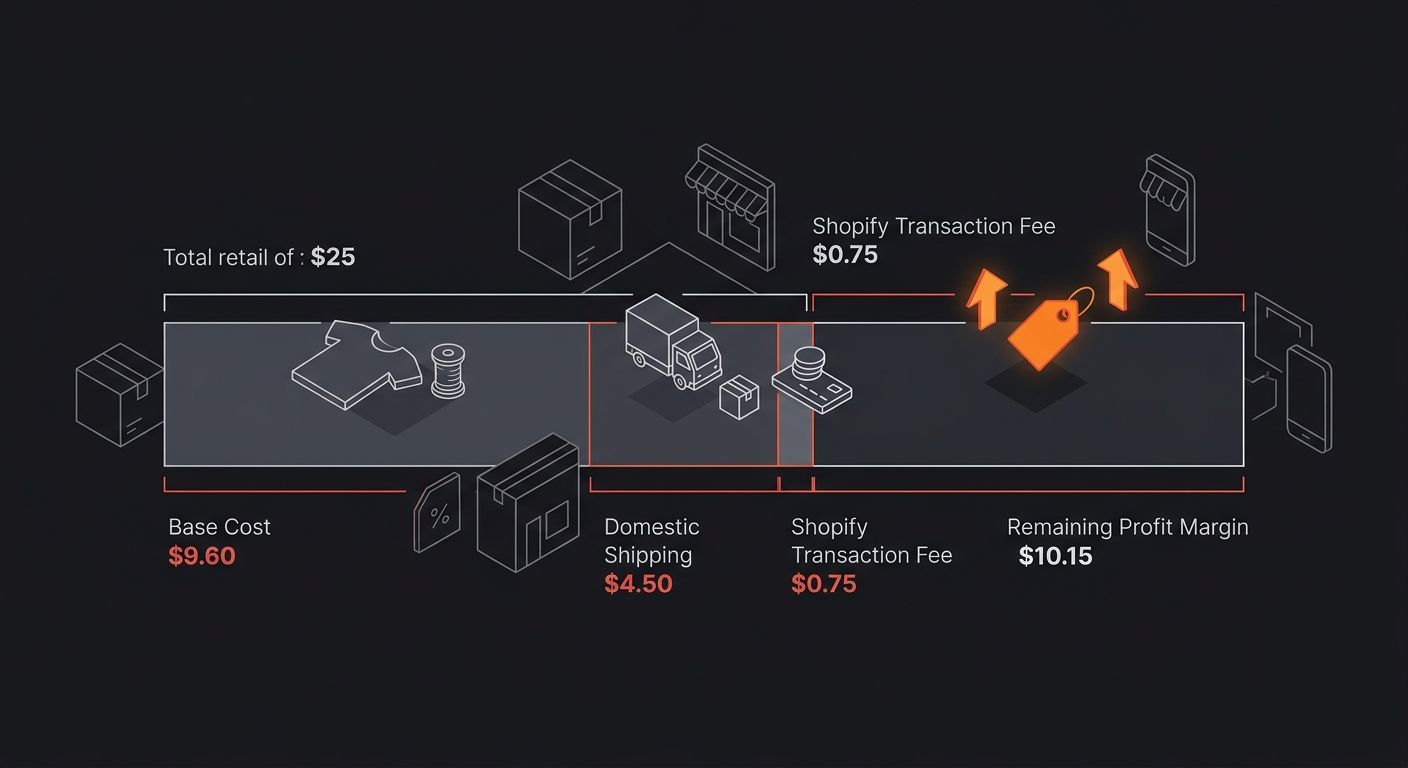
The math on Premium is straightforward. Suppose your average product base cost on the free tier is $12.00. With the Premium discount, that drops to roughly $9.60, a $2.40 savings per unit. At 11 orders per month, you've already covered the $24.99 subscription. Sellers processing 20+ orders monthly should switch without hesitation.
But watch the February 2026 pricing adjustment: the Premium plan's monthly rate increased while annual billing stayed stable. If you're committed to this model for 12+ months, lock in the annual rate.
Connecting to Shopify and Other Storefronts
The official Shopify setup documentation confirms integration takes about 90 seconds. Install the app from the Shopify App Store, open it within your Shopify admin, and log in to connect the accounts. You can also start from the dashboard side: sign up for a free account, click "Add a new store," select Shopify, and authorize the connection.
Once connected, products you create in the design tool publish directly to your Shopify catalog with synced titles, descriptions, images, variants, and prices. Orders placed on Shopify trigger automatic fulfillment. Tracking numbers push back to Shopify and forward to your customer without manual intervention.
The platform also integrates with Etsy, WooCommerce, Wix, BigCommerce, Squarespace, and its own Pop-Up storefront, a free built-in sales page for testing products without an external platform. If you're running cross-border operations through Shopify Markets, be aware that multi-currency pricing needs manual attention. The POD integration doesn't auto-convert retail prices across markets.
For sellers adding a second Shopify store to the same account, the help center specifies logging out of the first Shopify store before initiating the second connection from the dashboard.
Provider Selection Is Your Quality Control Layer
The decentralized provider network is simultaneously the platform's biggest advantage and its riskiest feature. Your customer's experience depends on a facility you've never visited, staffed by people you've never met, using equipment you can't inspect.
Here's how to run provider selection like a sourcing operation:
Filter by geography first. Domestic shipping inside the US typically takes 5-13 business days. Choosing a US-based provider for US customers and a European provider for EU customers cuts transit time and shipping cost. The fulfillment network spans the US, Canada, China, Australia, and Europe, so regional routing is available for most major markets. If you've read about how faster shipping can damage margins, the same principle applies here: paying for express fulfillment on a $25 t-shirt with a $10 margin destroys profitability at scale.
Sort by review score, then cross-check with sample orders. Provider review scores reflect aggregate seller experiences, but they don't capture how a provider handles your specific product category. A provider rated 4.7 overall might be excellent at mugs and mediocre at all-over-print hoodies. The only way to know is to order samples yourself.
Set production time expectations in your listings. Production runs 2-5 business days at most providers, plus shipping transit. Seller reviews on Trustpilot consistently praise the platform's ease of use but flag shipping variability as the primary friction point. Displaying realistic delivery windows (10-18 business days domestic, 15-30 international) in your product descriptions eliminates the most common source of customer complaints.
Where the Model Breaks
Three failure modes show up consistently once sellers scale past 50-100 orders per month.
Provider inconsistency across designs. A provider that nails a simple chest-logo tee might blow out color accuracy on a full-bleed design with gradients. The platform doesn't enforce color calibration standards across its network. Each provider runs its own ICC profiles and print settings. If you expand your design catalog without re-testing each new design on your assigned provider, you're gambling with customer satisfaction.
Multi-item order splitting. When a customer orders two products assigned to different providers, the order ships in two packages from two locations. The customer gets two tracking numbers, two delivery dates, and two unboxing experiences. There's no consolidation warehouse in the middle. For stores selling coordinated product bundles (matching hat plus tee plus tote), this creates a fragmented experience that's difficult to explain in post-purchase emails.
Provider capacity drops during Q4. Peak season stretches production times across the network. Providers that normally ship in 3 business days can push to 7-10 during November and December. And because these are independent operations, the platform has limited ability to enforce SLAs. You can mitigate this by assigning backup providers to your top-selling products and switching routing manually when your primary provider slows down, but that's operational overhead you manage yourself.
The decentralized model works well for sellers who treat provider management as an ongoing discipline. It breaks down for sellers who set a provider once and never revisit the decision. If you're comparing multiple POD providers on quality metrics, we've broken down the Printful versus Tapstitch tradeoffs in a separate analysis worth reading alongside this review.
Common Questions
Is the platform free to use?
Yes. The free tier charges zero platform fees and zero listing fees. You pay only the base product cost and shipping when an order is placed. The Premium plan at $24.99/month adds up to 20% product discounts and doubles the number of store connections from 5 to 10.
How does quality compare to Printful?
The platform wins on base product cost and catalog breadth (1,300+ items vs. Printful's 479). Printful wins on print consistency and branding options because it controls its own production facilities. The quality gap narrows significantly when you invest time in provider testing and stick with top-rated providers for your specific product types.
What shipping times should I tell customers?
Domestic US orders typically arrive in 5-13 business days (2-5 days production plus 3-8 days transit). International orders range from 10-30 business days depending on the provider's location relative to your customer. Display the longer end of these ranges in your listings to reduce disputes and refund requests.
Can I use multiple print providers for the same product?
You assign one provider per product listing. You can create duplicate listings with different providers assigned, or manually switch providers on an existing listing at any time. Some sellers maintain a primary and backup provider for their top 5 products and swap when production times spike during peak seasons.
Does the Premium plan pay for itself?
At a 20% discount on a $12 base-cost product, you save $2.40 per unit. The $24.99 monthly subscription breaks even at roughly 11 orders. Sellers processing 20+ orders per month recover the cost with meaningful margin to spare, making the upgrade a clear operational decision rather than a speculative one.

Ryan Torres
Ryan Torres is a former Amazon FBA seller turned dropshipping consultant who has generated over $2.8M in ecommerce revenue across 14 product launches. He specializes in supplier vetting, margin optimization, and scaling DTC operations for sub-$1M brands. Ryan focuses on actionable frameworks that drive measurable results for independent operators.
Frequently Asked Questions
- How does Printify pricing work and what are the costs?
- Printify operates on a free tier with zero platform fees, where you pay only the base product cost plus shipping per order. The Premium plan costs $24.99/month and offers up to 20% lower product costs, breaking even at around 11 orders per month for sellers with $12 average product costs.
- How long does it take to ship orders with Printify?
- Domestic US orders typically take 5-13 business days (2-5 days production plus 3-8 days transit), while international orders range from 10-30 business days depending on the provider's location. Production times can stretch to 7-10 business days during Q4 peak season.
- What is the difference between Printify and Printful?
- Printify wins on base product cost, catalog breadth (1,300+ items vs. Printful's 479), and shipping speed through its network of independent providers. Printful wins on print consistency and branding customization because it manufactures in-house at its own facilities.
- How do I choose a print provider on Printify?
- Filter providers by geography first to optimize shipping speed and cost, then sort by review score and order samples from multiple providers to test quality on your specific products. The article recommends ordering the same design from three different providers before committing to assess output quality side-by-side.
- Can I connect Printify to Shopify?
- Yes, integration takes about 90 seconds. Install the app from the Shopify App Store, log in to connect the accounts, and products you create will publish directly to your Shopify catalog with automatic order fulfillment and tracking updates.
- What happens when customers order multiple products from different providers?
- Orders ship in separate packages from different locations with two tracking numbers and delivery dates. There is no consolidation warehouse, so customers receive fragmented shipments that can be difficult to explain, especially for coordinated product bundles.
- Is Printify free to use?
- Yes, the free tier charges zero platform fees and zero listing fees. You only pay the base product cost and shipping when an order is placed, with no hidden charges.
Related Articles

Printful vs Printify: Which Platform Wins
Printful and Printify completed a corporate merger but still operate as separate platforms with independent pricing, fulfillment networks, and dashboards. POD sellers face three real paths: Printful for brand control, Printify for margin, or a hybrid splitting the catalog across both.
Printful print-on-demand App Review: Features & Costs
Printful's base product costs run 15–35% higher than Printify's on comparable items, while Gelato undercuts both on international fulfillment speed through local production routing. The right print-on-demand platform depends on whether you're optimizing for quality, margin, or geographic reach.

Printful's 479-Product Catalog Outweighs Tapstitch's Apparel Quality Edge in New POD Platform Comparison
Printful's 479-product catalog spanning apparel, home decor, and accessories gives it a decisive edge over Tapstitch's 400-blank apparel-only range despite Tapstitch's vertically integrated quality advantage in streetwear fulfillment, according to a platform comparison published July 8 by Ecommerce-
Explore more topics